

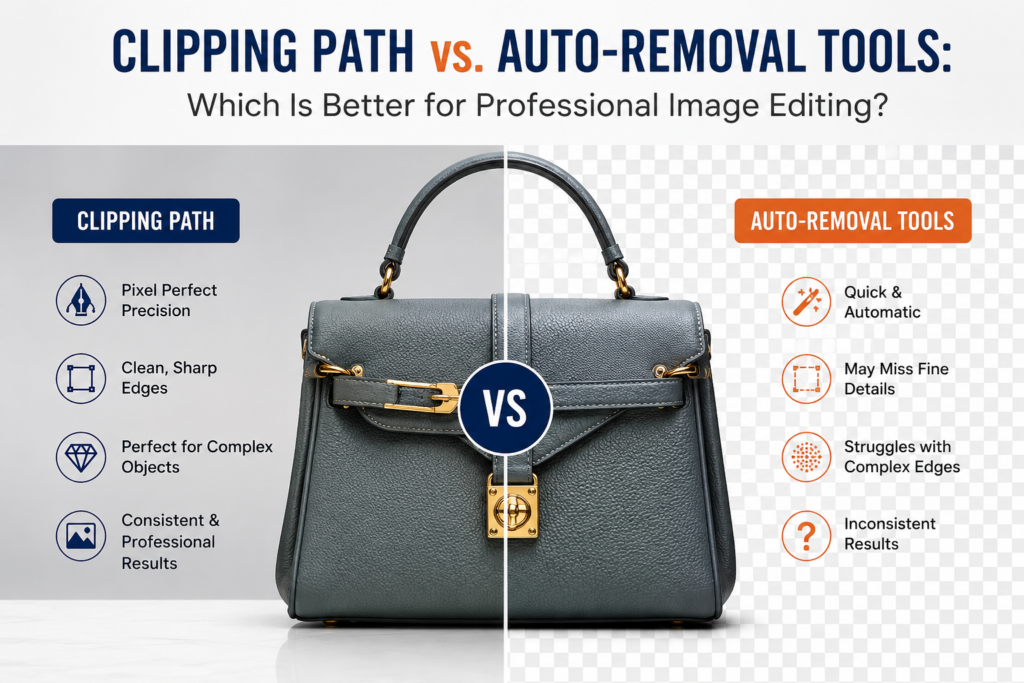
Artificial intelligence has transformed photo editing. With a single click, AI-powered background removal tools can isolate subjects in seconds, making image editing faster than ever. These tools are ideal for quick tasks, social media posts, and simple product images.
However, when image quality directly impacts sales, branding, and customer trust, automation still has significant limitations.
Professional photographers, eCommerce businesses, fashion brands, jewelry retailers, and advertising agencies continue to rely on manual clipping path services because precision matters.
In this guide, we’ll compare manual clipping paths with AI background removal tools, explain where automation succeeds, where it fails, and why professional editors remain essential for high-quality image editing.
What Is a Clipping Path?
A clipping path is a manually created vector path drawn around an object using the Pen Tool in Adobe Photoshop.
Instead of relying on artificial intelligence to guess the object’s edges, professional editors carefully trace every contour by hand.
The result is
- Pixel-perfect cutouts
- Clean and smooth edges
- High-resolution accuracy
- Editable paths
- Professional-quality product images
Because clipping paths are vector-based, they remain accurate regardless of image size.
What Are Auto-Background Removal Tools?
AI background removal tools use machine learning to identify the subject automatically.
Popular examples include:
- Remove.bg
- Adobe Express
- Canva Background Remover
- Photoroom
- Pixelcut
These tools analyze colors, shapes, and contrast to separate the subject from its background.
For simple products on plain white backgrounds, the results can be surprisingly good.
But they are not perfect.
Where AI Performs Well
Automation works best when images are simple.
Examples include:
- Shoes
- Books
- Boxes
- Electronics
- Bottles
- Furniture
- Toys
- Products with strong contrast
These objects usually have:
- Straight edges
- Simple outlines
- No transparency
- No overlapping elements
- Plain backgrounds
In these situations, AI can produce acceptable results within seconds.
Where Automation Starts to Fail
As image complexity increases, AI begins making noticeable mistakes.
1. Hair and Fur

Hair contains thousands of tiny strands.
AI often:
- Removes fine hair
- Creates jagged edges
- Produces halos
- Makes hair appear unnatural
- Cuts off flyaway strands
Professional editors manually refine every edge for natural-looking results.
2. Transparent Products

Transparent objects are extremely difficult for AI.
Examples include:
- Glass bottles
- Perfume
- Wine glasses
- Acrylic products
- Plastic packaging
AI frequently mistakes transparent areas for the background, resulting in missing reflections and unrealistic edges.
Manual clipping preserves the following:
- Reflections
- Refractions
- Glass transparency
- Natural shadows
3. Jewelry

Jewelry photography demands exceptional precision.
Tiny details include:
- Diamond prongs
- Chain links
- Gemstone edges
- Metallic reflections
- Fine engravings
AI often removes or blurs these details, making expensive products look cheap.
Professional clipping preserves every intricate feature while maintaining natural reflections.
4. Complex Fashion Products
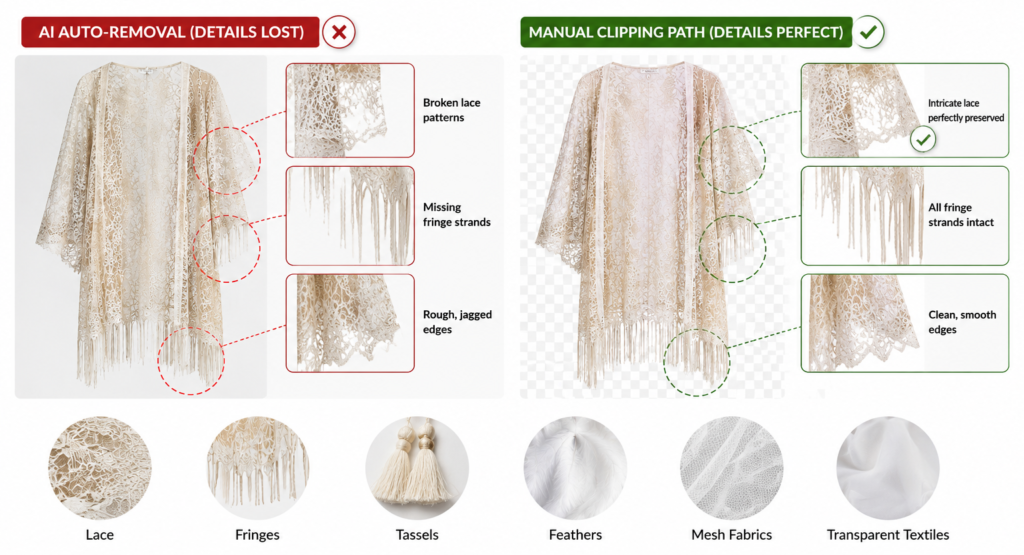
Fashion items often include:
- Lace
- Fringes
- Tassels
- Feathers
- Mesh fabrics
- Transparent textiles
AI struggles to separate these intricate textures from the background.
Manual clipping ensures every detail remains intact.
5. Products with Similar Background Colors
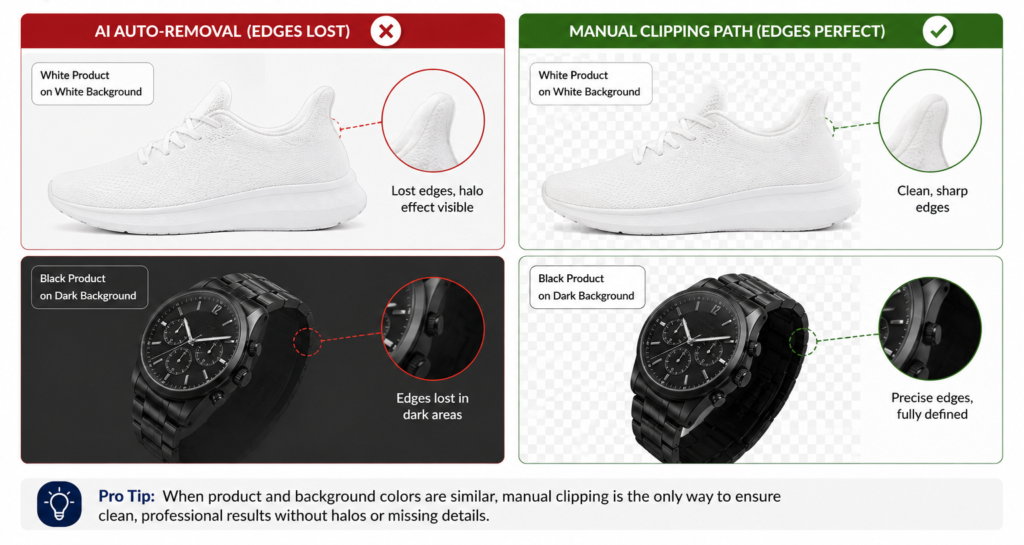
AI relies heavily on contrast.
If a white product sits on a white background or a black product on a dark background, automation often loses the object’s edges.
Professional editors manually define these boundaries with precision.
Common AI Background Removal Problems
Businesses frequently encounter issues such as the following:
- Jagged edges
- Missing object details
- Uneven cutouts
- White halos
- Dark outlines
- Color contamination
- Missing shadows
- Over-smoothed edges
- Cropped product parts
- Loss of transparency
These flaws may seem minor but can reduce the perceived quality of a product and affect customer confidence.
Why Manual Clipping Still Wins
Professional clipping path services provide:
Superior Accuracy
Every anchor point is placed manually.
Nothing is guessed.
Consistent Quality
Hundreds or thousands of images maintain the same editing standard.
Better Branding
Clean product images create a premium shopping experience.
Print-Ready Results
Manual paths are suitable for
- Magazines
- Catalogs
- Packaging
- Billboards
- High-resolution advertising
Full Editing Flexibility
Editors can easily:
- Change backgrounds
- Add shadows
- Create reflections
- Apply color corrections
- Perform advanced retouching
AI vs. Manual Clipping Path Comparison
| Feature | AI Auto Removal | Manual Clipping Path |
|---|---|---|
| Speed | ⭐⭐⭐⭐⭐ | ⭐⭐⭐ |
| Accuracy | ⭐⭐⭐ | ⭐⭐⭐⭐⭐ |
| Hair Details | ❌ | ✅ |
| Jewelry | ❌ | ✅ |
| Transparent Objects | ❌ | ✅ |
| Fashion Apparel | ⭐⭐⭐ | ⭐⭐⭐⭐⭐ |
| Print Quality | ⭐⭐ | ⭐⭐⭐⭐⭐ |
| Professional Retouching | Limited | Excellent |
| Consistency | Moderate | Outstanding |
Best Use Cases for AI
AI background removal is ideal for:
- Social media graphics
- Internal presentations
- Quick mockups
- Temporary marketing materials
- Large batches of simple product photos
If perfection isn’t required, automation can save time.
Best Use Cases for Manual Clipping Paths
Choose professional clipping path services when working with:
- Jewelry
- Watches
- Luxury products
- Fashion apparel
- Ghost mannequin images
- Cosmetics
- Furniture
- Transparent packaging
- Glass products
- Automotive parts
- High-end eCommerce stores
- Amazon product listings
- Shopify stores
- Print advertising
These images require a level of precision that AI cannot consistently achieve.
Can AI and Manual Editing Work Together?
Absolutely.
Many professional photo editing companies use a hybrid workflow:
- AI performs the initial background removal.
- A professional editor manually corrects edges and imperfections.
- Final retouching ensures flawless, high-quality results.
This approach combines speed with professional accuracy, making it ideal for large-scale eCommerce projects.
Why eCommerce Businesses Still Choose Manual Editing
Product photography directly influences purchasing decisions.
Poorly edited images can:
- Reduce customer trust
- Increase product returns
- Lower conversion rates
- Damage brand reputation
High-quality, professionally edited images create a polished and trustworthy online store, helping businesses stand out in a competitive market.
Final Thoughts
AI background removal tools have come a long way, offering impressive speed and convenience for simple editing tasks. However, when it comes to preserving intricate details like hair, jewelry, transparent objects, delicate fabrics, and complex product edges, automation still falls short.
For brands that prioritize image quality, consistency, and professionalism, manual clipping paths remain the gold standard. By combining skilled craftsmanship with modern editing workflows, businesses can ensure every product image meets the highest visual standards—building customer confidence and driving better sales.
Frequently Asked Questions (FAQs)
Is a manual clipping path better than AI background removal?
Yes. Manual clipping paths provide greater precision, especially for complex objects such as hair, jewelry, transparent products, and intricate apparel.
Does AI work well for all product photos?
No. AI performs best on simple objects with clear edges and plain backgrounds. Complex products often require manual refinement.
Why do AI background removers leave halos?
AI can struggle to distinguish subtle edge transitions, leading to leftover background pixels or overly aggressive cutouts.
Can manual clipping paths improve eCommerce sales?
Professional, clean product images enhance customer trust, improve brand perception, and can contribute to higher conversion rates.
Should businesses use AI or manual editing?
For quick, simple edits, AI is an excellent choice. For premium product photography, advertising, catalogs, and high-end eCommerce, manual clipping paths deliver the best results.